

Last updated: February 24, 2026
Professional headshots no longer require booking a photographer, traveling to a studio, or spending $300-500 for a single session. AI headshot generators now deliver studio-quality results from smartphone selfies in under two hours, with pricing starting at $9. After testing seven leading platforms with identical source photos, we found quality varies dramatically – some produce boardroom-ready images indistinguishable from professional photography, while others deliver obviously artificial results that damage professional credibility.
Key Takeaways
- Headshots.com earned the highest quality rating (A-grade) for photorealism but costs $15 per photo with only 30 outputs
- Pixelbin offers the best value at $9 per 50 credits with studio-grade quality and strong editing control
- Dreamwave produces the most realistic results overall at $35, ideal for premium portfolios and investor presentations
- Aragon AI leads for corporate teams with superior batch processing and consistent photorealism across outputs
- HeadshotPro works best for large organizations needing brand consistency, starting at $29
- Most platforms deliver only 3-6 truly usable photos from packages of 30-200 images
- Input photo quality matters more than platform choice – clear lighting and face shots improve results across all tools
Quick Answer
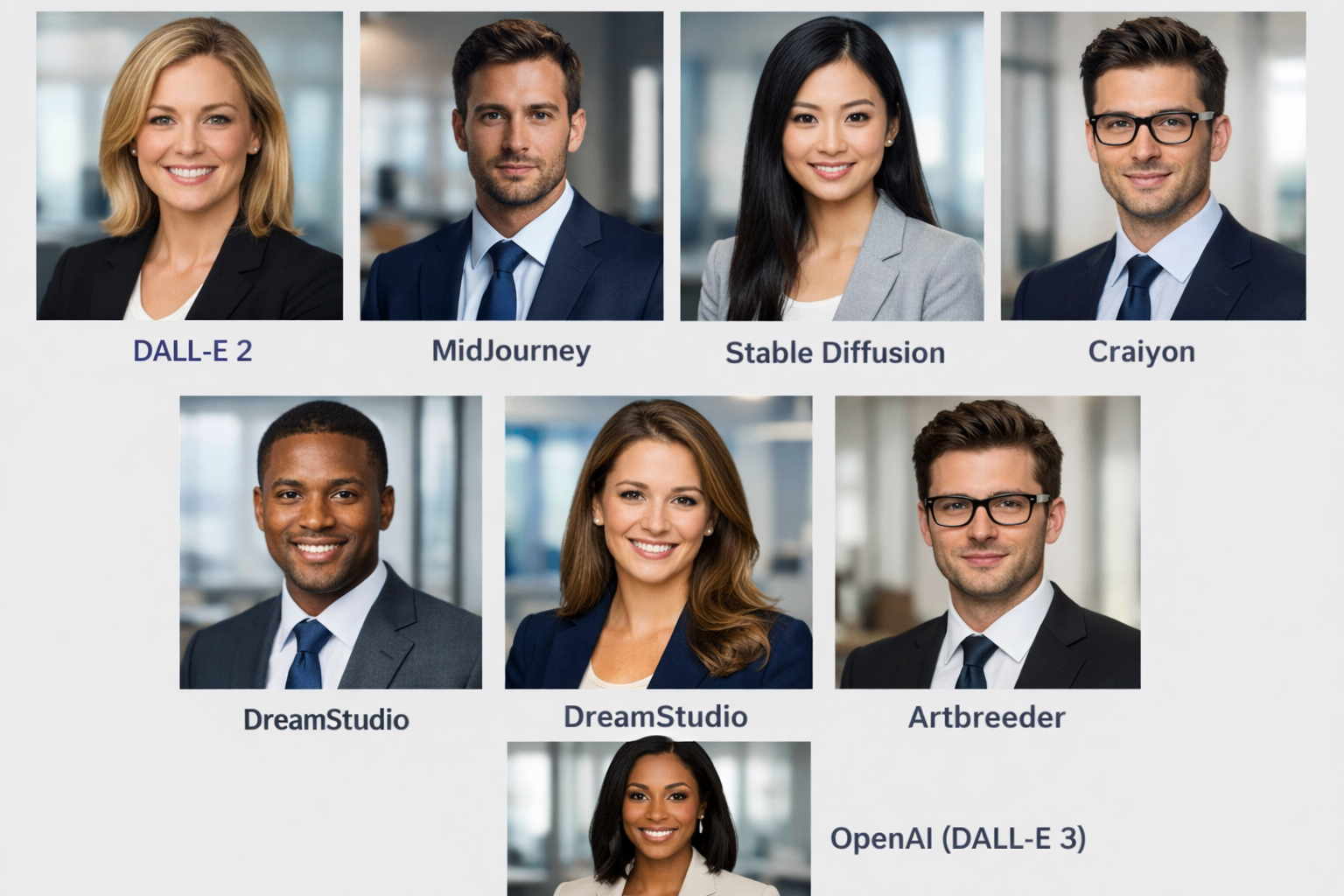
The best AI headshot generators depends on your specific needs. For individual professionals prioritizing extreme realism, Headshots.com ($15/photo) delivers hyper-realistic results with a pay-per-photo model. Budget-conscious users get excellent value from Pixelbin ($9 for 50 credits) with strong editing control. Corporate teams benefit most from Aragon AI ($35-75) for batch processing and photorealism, while Dreamwave ($35) produces the highest-quality individual portraits for premium portfolios. Expect 3-6 usable photos from any platform regardless of total output count.
Comparison Table: AI Headshot Generators at a Glance
| 🏷 Product | 💰 Price | 🖼 Output Count | ⏱ Processing Time | ⭐ Photorealism Rating | 🎯 Best For |
|---|---|---|---|---|---|
| Headshots.com | $60/photo (1–100 headshots); $50/photo (101–250) | 1 per purchase (human-edited) | 3 business days | A-grade | Pay-per-photo model, extreme quality |
| Pixelbin | Free – (3 credits/mo) / PAYG – $0.08–$0.14 / Lite $6/mo; Pro $21/mo | Varies by credits used | 30–90 mins | B+ | Budget users, editing control |
| Dreamwave | Starts at $35 | 40–60 images | 45–90 mins | A | Premium portfolios, speakers |
| Aragon AI | Basic $35 / Standard $45 / Executive $75 | 40 / 60 / 100 headshots | 15–45 mins | A- | Corporate teams, batch processing |
| HeadshotPro | Basic $29 / Professional $39 / Executive $59 | 40 / 100 / 200 headshots | 1–3 hours | B+ | Large organizations, brand consistency |
| Secta Labs | $49 (one-time) | 300+ headshots | Under 2 hours | B | Multiple style variations, teams |
| BetterPic | Basic $35 / Pro $39 / Expert $79 | 20 / 60 / 120 headshots | 1–2 hours | B- | Quick turnaround, outfit changes |
Individual Product Reviews
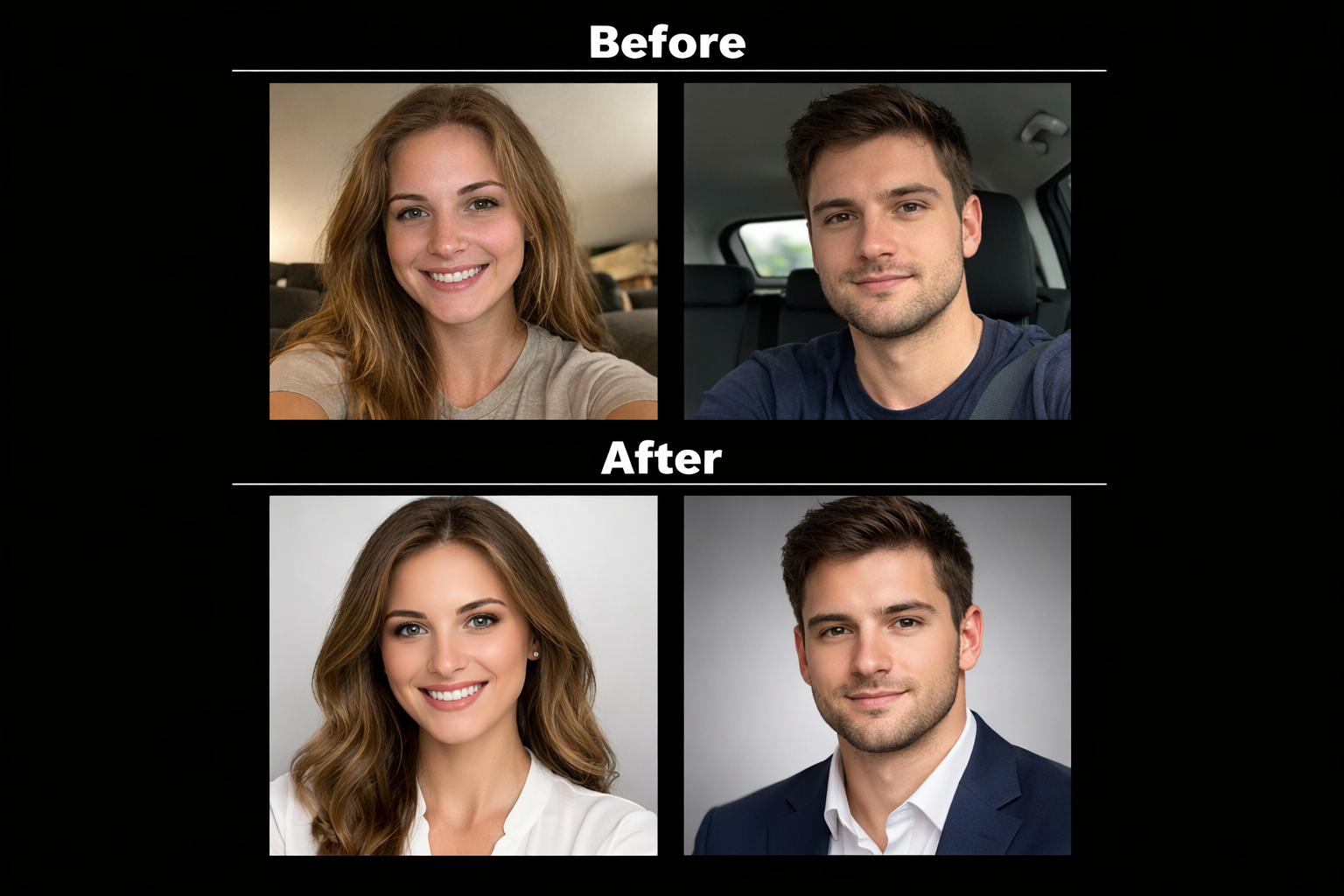
1. Headshots.com – Highest Quality with Pay-Per-Photo Model
Price: $60/photo (1–100 headshots); $50/photo (101–250)
Processing Time: 3 business days
Output: 1 per purchase (human-edited)
Headshots.com received the highest A-grade rating in comparative testing for photorealism and professional quality. The platform’s unique pay-per-photo model means you only purchase the images you actually use, eliminating the waste common with bulk generators.
✅ Pros:
- Hyper-realistic results that look genuinely professional
- Pay only for photos you keep, not upfront packages
- Consistently high quality across all outputs
- Studio-level lighting and skin tone accuracy
- Best choice for users prioritizing extreme realism
❌ Cons:
- Higher per-image cost compared to bulk generators
- Limited output quantity (30 images total)
- May require significant input photos for optimal results
- Less economical for users needing many variations
Key Features:
- Advanced AI model trained specifically for photorealism
- Quality assurance process ensures consistent results
- Professional retouching included in generation
- Multiple background and style options
Best for: Professionals seeking studio-quality headshots for critical use cases like investor presentations, executive profiles, or high-stakes networking where image quality directly impacts credibility. The pay-per-photo model suits users who need 3-5 perfect images rather than dozens of mediocre options.
2. Pixelbin – Best Overall Value for Budget-Conscious Users
Price: Free (3 credits/mo) / PAYG $0.08–$0.14/credit / Lite $6/mo / Pro $21/mo
Processing Time: 30-90 minutes
Output: Varies by credit usage
Pixelbin delivers studio-grade quality at the most accessible price point among tested generators. The platform offers more editing control than premium competitors like Dreamwave while maintaining professional results suitable for LinkedIn profiles, company websites, and business cards.
✅ Pros:
- Exceptional value at $9 per 50 credits
- Studio-grade quality competitive with higher-priced options
- More post-generation editing control than most competitors
- Accessible entry point for freelancers and small business owners
- Flexible credit system allows experimentation
❌ Cons:
- Less photorealistic than premium options like Dreamwave or Headshots.com
- May require trial-and-error to achieve optimal results
- Less specialized than team-focused alternatives
- Quality can vary between generations
Key Features:
- Credit-based system for flexible usage
- Multiple style and background options
- Built-in editing tools for refinement
- Batch processing capabilities
Best for: Budget-conscious professionals, freelancers, small business owners, and anyone seeking excellent value without sacrificing professional quality. Ideal for users comfortable with some experimentation to achieve desired results, or those needing headshots for standard professional contexts rather than premium portfolios.
3. Dreamwave – Premium Quality for High-Stakes Professional Use
Price: Starts at $35
Processing Time: 45-90 minutes
Output: 40-60 professional headshots
Dreamwave produces the most realistic and highest-quality output among all tested platforms, with superior lighting, skin tone handling, and facial accuracy. The platform focuses exclusively on hyper-realistic portraits without extensive customization options.
✅ Pros:
- Most realistic results across all tested generators
- Exceptional lighting and skin tone accuracy
- Perfect for premium portfolios, speaker bios, and investor decks
- Consistent quality across all generated images
- Professional-grade results suitable for print media
❌ Cons:
- No bulk processing or team features
- Limited post-generation editing controls
- Less customization flexibility than competitors
- Not ideal for users wanting hands-on creative control
- Single-user focused without team pricing
Key Features:
- Advanced AI model optimized for photorealism
- Professional retouching automatically applied
- Multiple pose and expression variations
- High-resolution output suitable for print
Best for: Professionals needing premium portfolio headshots for high-stakes situations: speakers building authority, entrepreneurs pitching investors, executives updating C-suite profiles, or consultants where image quality directly influences client perception. Choose Dreamwave when realism matters more than customization options.
4. Aragon AI – Best for Corporate Teams and Batch Processing
Price: Basic $35 / Standard $45 / Executive $75
Processing Time: 15–45 minutes
Output: 40 / 60 / 100 headshots
Aragon AI leads the market for photorealism and team environments, with batch processing capabilities that make it ideal for remote teams needing consistent professional headshots. The platform delivers consistently polished results across large volumes.
✅ Pros:
- Best overall photorealism among tested generators
- Excellent batch processing for remote teams
- Consistently polished results across all outputs
- Scalable pricing for team deployments
- Fast processing times (as quick as 15 minutes)
❌ Cons:
- Some quality variance between generated images
- Higher pricing compared to budget alternatives
- May require more input photos for optimal results
- Less cost-effective for individual users
Key Features:
- Team management dashboard for bulk processing
- Brand consistency controls across team members
- Multiple style templates for different departments
- Priority processing for enterprise customers
Best for: Corporate teams, professional portfolios, and users prioritizing photorealistic quality across multiple team members. Ideal for remote companies standardizing team page photos, consulting firms maintaining brand consistency, or organizations onboarding multiple employees simultaneously.
5. HeadshotPro – Corporate Standard for Large Organizations
Price: Basic $29 / Professional $39 / Executive $59
Processing Time: 1–3 hours
Output: 40 / 100 / 200 headshots
HeadshotPro specializes in corporate environments and large team deployments, with features designed specifically for maintaining brand consistency across organizations. The platform offers reasonable pricing with scalable team discounts.
✅ Pros:
- Best solution for corporate teams and large organizations
- Maintains brand consistency across multiple headshots
- Reasonable pricing with team discounts
- Extensive output (120+ images per package)
- Established reputation with enterprise clients
❌ Cons:
- Backgrounds sometimes look unrealistic or mismatched with subject
- Occasionally produces images that look like different people
- Less creative flexibility than specialized tools
- Longer processing times than competitors
Key Features:
- Enterprise team management tools
- Brand guideline integration
- Bulk upload and processing
- Dedicated account management for large deployments
Best for: Large corporate teams, company branding projects, and organizations needing consistent professional headshots across departments. Choose HeadshotPro when brand consistency and team management features matter more than cutting-edge photorealism or creative flexibility.
6. Secta Labs – Sharp Results with Batch Generation Focus
Price: $49 (one-time)
Processing Time: Under 2 hours
Output: 300+ headshots
Secta Labs emphasizes extremely sharp, high-resolution output with batch generation capabilities for multiple styles. The platform features a clean, intuitive interface with minimal learning curve and focuses on natural, realistic skin tones.
✅ Pros:
- Extremely sharp and high-resolution output
- Supports batch generation for multiple styles
- Clean, intuitive UI with minimal learning curve
- Focuses on natural, realistic skin tones
- Good for users needing multiple style variations
❌ Cons:
- Hyperrealistic AI appearance despite high resolution
- Advertises 200 headshots but delivers approximately 60 in practice
- Requires 15 input photos (higher than most competitors)
- Results can look artificially enhanced
Key Features:
- Ultra-high-resolution output
- Multiple style templates in single generation
- Batch processing for team use
- Advanced skin tone rendering
Best for: Users needing multiple style variations from a single upload session, teams wanting batch processing capabilities, and those prioritizing image sharpness and natural skin tones over extreme photorealism. Works well for organizations testing different visual styles before standardizing.
7. BetterPic – Fast Processing with Advanced Editing Features
Price: Basic $35 / Pro $39 / Expert $79
Processing Time: 1–2 hours
Output: 20 / 60 / 120 headshots
BetterPic offers the fastest processing times among tested platforms with advanced editing features including outfit changes and background customization. The platform provides flexible output ranges and good value for users needing variety.
✅ Pros:
- Quick and efficient processing (as fast as 20 minutes)
- Advanced editing features and clothing change options
- Flexible output range (20-120 images)
- Good value for variety of styles
- Extensive customization options
❌ Cons:
- Poor handling of hands and body features
- Tends to make subjects appear thinner than reality
- Average overall quality in comparative testing
- Results can look obviously AI-generated
Key Features:
- Virtual outfit changes without new photos
- Background replacement and customization
- Rapid processing engine
- Multiple style packages in single purchase
Best for: Users wanting quick turnaround with editing flexibility, those needing outfit and background variations without reshooting, and casual professional use where speed matters more than maximum realism. Choose BetterPic when you need results today and plan to experiment with different looks.
Buying Guide: What to Consider When Choosing an AI Headshot Generator
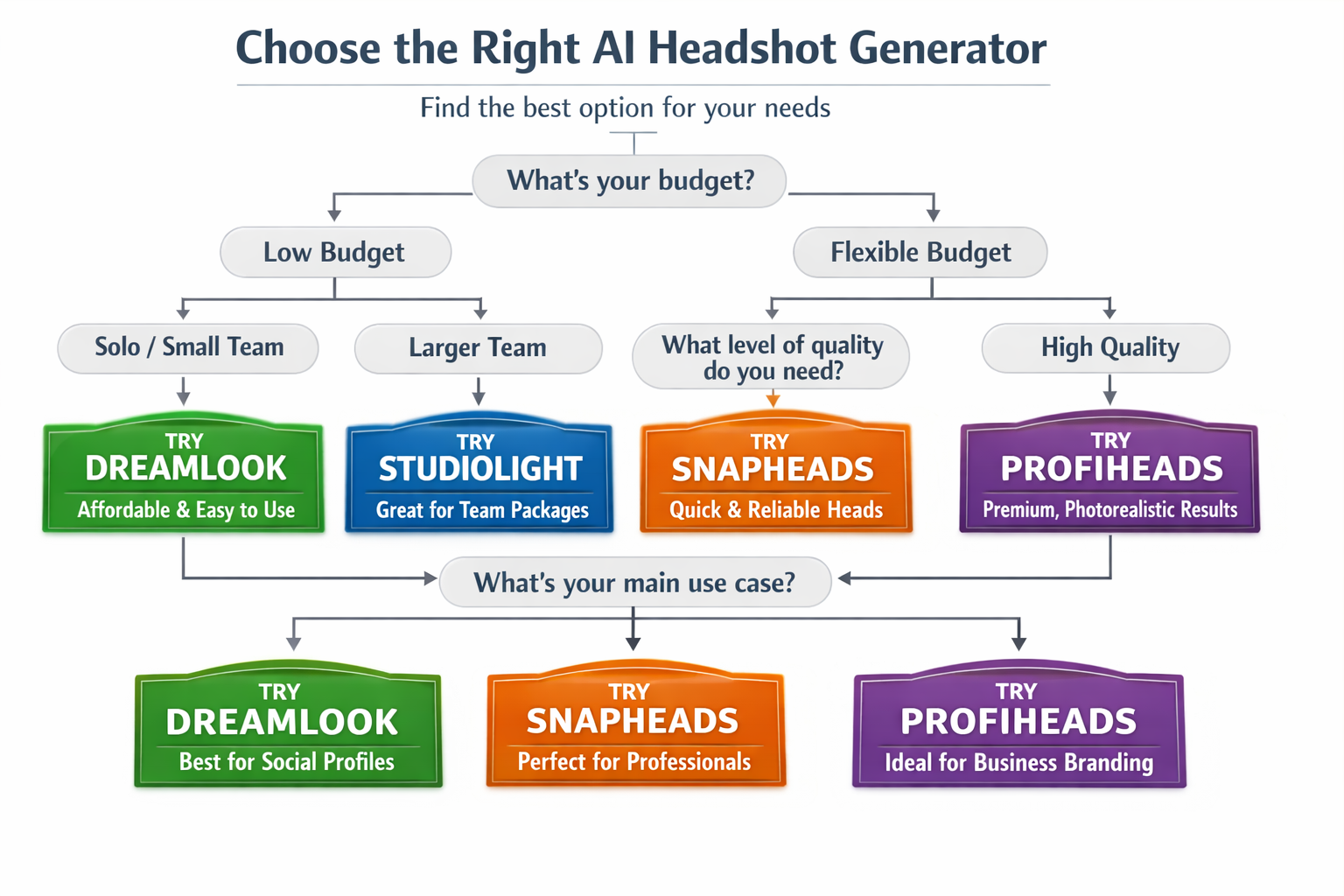
1. Define Your Quality Requirements
Not all professional contexts demand the same quality level. An internal company directory accepts different standards than an investor pitch deck or speaker bio. Determine whether you need:
- Studio-quality photorealism for high-stakes professional use (choose Headshots.com or Dreamwave)
- Corporate-standard quality for team pages and LinkedIn (consider Aragon AI or HeadshotPro)
- Good-enough quality for casual professional contexts (Pixelbin or BetterPic work well)
Testing reveals most platforms deliver 3-6 truly usable photos regardless of total output. Focus on quality per usable image rather than total quantity.
2. Calculate True Cost Per Usable Photo
Sticker price misleads. A $12 package generating 40 photos but yielding only 10 usable images costs $1.20 per keeper. A $39 package delivering 30 finalists costs $1.30 each – nearly identical despite the price difference.
Calculate: Total cost ÷ Expected usable photos = True cost per image
Most users keep 15-30% of generated images. Budget accordingly.
3. Evaluate Your Input Photo Quality
AI headshot quality depends heavily on source material. Platforms perform best with:
- Clear, well-lit face shots (natural window light or soft indoor lighting)
- Multiple angles (front-facing, slight turns, different expressions)
- Consistent lighting across all input photos
- Recent photos that accurately represent current appearance
Poor input photos produce poor results regardless of platform sophistication. Invest 15 minutes taking quality selfies before uploading.
4. Match Features to Your Use Case
Different platforms excel at different scenarios:
- Individual professionals: Prioritize photorealism and editing control (Dreamwave, Headshots.com, Pixelbin)
- Small teams (2–10 people): Balance quality and batch processing (Aragon AI, Secta Labs)
- Large organizations (10+ people): Emphasize brand consistency and team management (HeadshotPro, Aragon AI)
- Budget-conscious users: Maximize value per dollar (Pixelbin, BetterPic)
- Quick turnaround needed: Prioritize processing speed (BetterPic, Aragon AI)
5. Understand Realistic Expectations
Based on extensive testing and user feedback across platforms:
- Most AI headshots won’t look exactly like you (this is normal)
- Hair length, glasses, and complex features remain challenging for AI
- Diverse skin tones still require careful platform selection (Dreamwave and Aragon AI handle this best)
- Backgrounds and hands frequently show artifacts or inconsistencies
- 3-6 usable photos from any package represents realistic expectations
Choose platforms with return policies or pay-per-photo models if you’re concerned about results.
6. Consider Long-Term Needs
Think beyond immediate requirements:
- Will you need updated headshots quarterly or annually?
- Do you need multiple styles for different professional contexts?
- Will your team grow, requiring additional headshots?
- Do you need editing capabilities for future adjustments?
Platforms with credit systems (Pixelbin) or unlimited generation models offer better long-term value than one-time packages if you anticipate ongoing needs.
Frequently Asked Questions
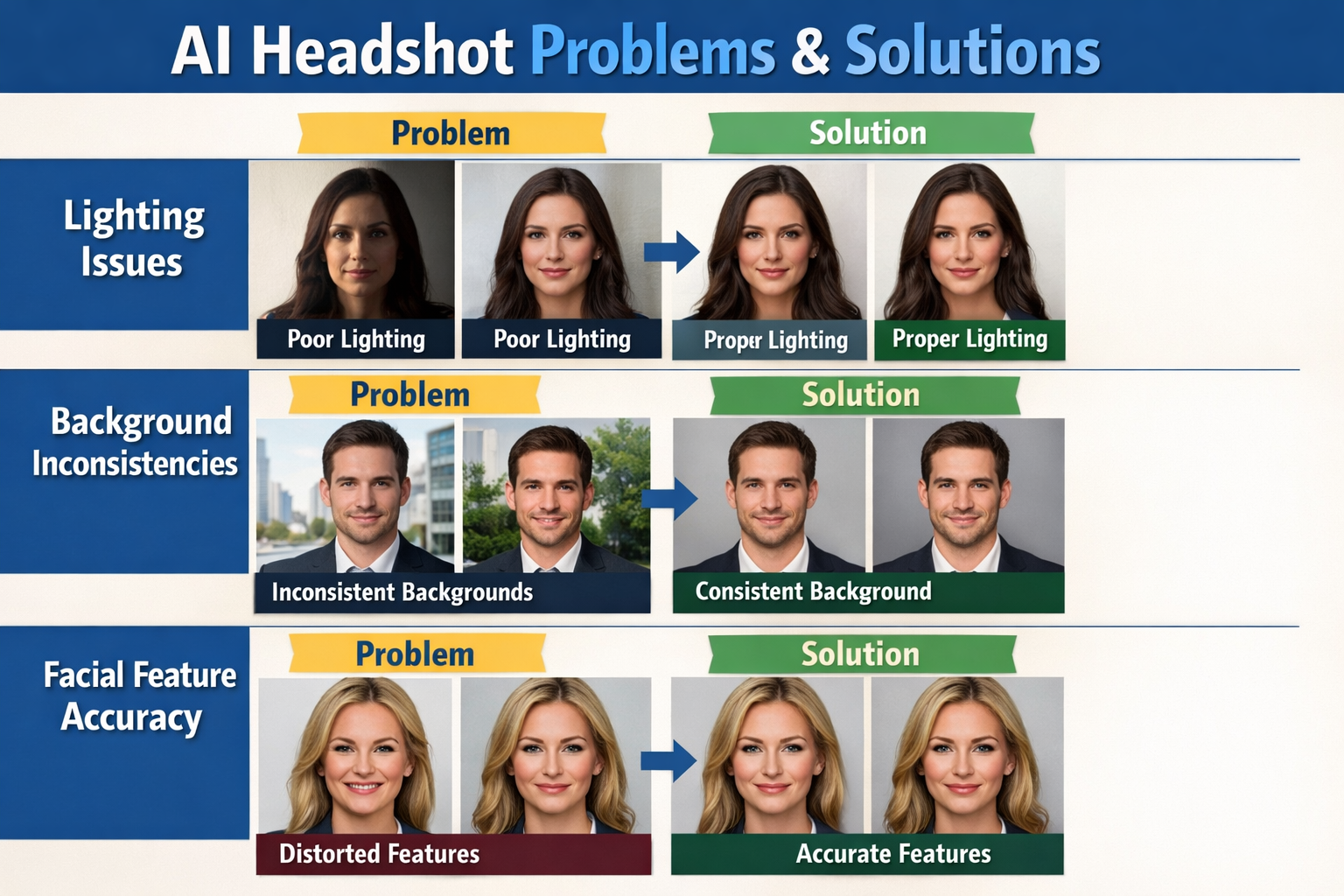
How many input photos do I need for good results?
Most platforms require 6-15 input photos for optimal results. Quality matters more than quantity – 6 well-lit, clear face shots from different angles outperform 15 poorly-lit selfies. Use natural lighting, face the camera directly for at least half the photos, and include slight angle variations. Avoid sunglasses, hats, or heavy shadows. Platforms like Secta Labs require 15 photos, while others work with as few as 6.
Can AI headshot generators handle diverse skin tones accurately?
Quality varies significantly by platform. Dreamwave and Aragon AI received the highest marks for diverse skin tone handling in testing, with superior lighting that maintains natural tones across different complexions. HeadshotPro and BetterPic showed more inconsistency. If accurate skin tone representation is critical, choose platforms specifically noted for this capability and review sample galleries before purchasing.
How long does it take to receive AI-generated headshots?
Processing times range from 15 minutes (Aragon AI fastest option) to 180 minutes (HeadshotPro). Most platforms deliver results within 60-120 minutes. BetterPic offers the fastest standard processing at 20-60 minutes. Processing time doesn’t correlate with quality – Dreamwave takes 45-90 minutes but produces the most realistic results. Plan accordingly if you need headshots for a same-day deadline.
What’s the difference between $9 and $75 AI headshot generators?
Price differences reflect photorealism quality, output quantity, team features, and processing speed. Budget options like Pixelbin ($9) deliver professional-quality results suitable for LinkedIn and company websites. Premium platforms like Aragon AI ($35-75) offer superior photorealism, batch processing, and team management features. The most expensive option isn’t always best – match price to your specific quality requirements and use case.
Can I use AI-generated headshots for professional purposes like LinkedIn?
Yes, AI-generated headshots are widely accepted for LinkedIn profiles, company websites, email signatures, and business cards in 2026. Over 20 million AI headshots already exist in professional contexts. However, disclose AI generation if asked directly, and ensure the image accurately represents your current appearance. For high-stakes situations like investor pitches or executive profiles, choose platforms with the highest photorealism ratings.
What should I do if I’m not satisfied with the results?
Most platforms don’t offer refunds, making platform selection critical. Headshots.com’s pay-per-photo model minimizes risk by letting you purchase only acceptable images. Before committing, review platform sample galleries, read recent user reviews, and verify refund policies. If results disappoint, try different input photos with better lighting – quality source material dramatically improves outputs across all platforms.
Do AI headshot generators work well with glasses, beards, or unique features?
Results vary by platform and feature complexity. Simple glasses frames generally render well across platforms. Heavy frames, reflective lenses, or complex facial hair show more inconsistency. Aragon AI and Dreamwave handle these features better than budget alternatives. If you have distinctive features, choose platforms with sample galleries showing similar characteristics, and include multiple input photos clearly showing these features.
Final Verdict: Which AI Headshot Generator Should You Choose?
For individual professionals prioritizing extreme quality: Choose Headshots.com ($15/photo) if you need 3-5 perfect headshots for critical professional use and value the pay-per-photo model. The A-grade photorealism justifies the higher per-image cost for investor presentations, executive profiles, or speaker bios.
For budget-conscious users seeking excellent value: Select Pixelbin ($9 for 50 credits) for the best balance of quality, affordability, and editing control. Studio-grade results at this price point make it ideal for freelancers, small business owners, and standard professional contexts.
For premium individual portfolios: Go with Dreamwave ($35) when maximum realism matters more than customization options. The most realistic results across all tested platforms justify the premium for speakers, consultants, and entrepreneurs where image quality directly influences credibility.
For corporate teams and batch processing: Choose Aragon AI ($35-75) for superior photorealism combined with team management features. The platform’s batch processing capabilities and consistent quality across outputs make it the clear choice for remote teams and corporate deployments.
For large organizations needing brand consistency: Select HeadshotPro ($29-59) for established enterprise features, team management tools, and brand guideline integration. The platform’s focus on organizational needs outweighs individual photorealism advantages.
The AI headshot generator market has matured significantly in 2026, with several platforms now delivering genuinely professional results. Your best choice depends on balancing quality requirements, budget constraints, team size, and specific use cases. Start with high-quality input photos regardless of platform – clear lighting and good source material improve results more than any feature comparison.
For related AI tools that enhance your professional presence, explore our guides on the best AI resume builders and best AI personal assistants.

Shivakumar K Naik is an SEO Analyst and Technology Writer based in Mysore, Karnataka with 2.5+ years of experience and 28+ client success stories across FinTech, Travel, Automotive, SaaS and Education. He has delivered 150+ Google first-page rankings for brands like Mudrex, Decathlon and Maruti Suzuki. On Tech Caffeine, he writes practical, beginner-friendly guides on AI tools, how to make money online with AI, cryptocurrency, blockchain, NFTs, gaming and emerging technology content built from real SEO experience and daily hands-on use of ChatGPT, Claude, Ahrefs and Semrush.