
Last updated: March 25, 2026
Quick Answer: The best AI personal assistants in 2026 are Siri, Google Assistant, Amazon Alexa, Microsoft Copilot, Samsung Bixby, ChatGPT, Google Gemini, Claude, Perplexity AI, and Notion AI. The right choice depends on your device ecosystem, primary use case, and how much you value privacy versus capability. Google Assistant and ChatGPT lead for general-purpose use; Siri and Bixby are best if you’re locked into Apple or Samsung hardware; Claude and Perplexity stand out for research-heavy tasks.
Key Takeaways
- AI personal assistants use natural language processing (NLP) and machine learning to interpret voice or text commands and complete tasks on your behalf.
- The “best” assistant depends on your ecosystem: Apple users get the most from Siri, Android users from Google Assistant, and Windows users from Microsoft Copilot.
- ChatGPT, Claude, and Perplexity AI have emerged as serious productivity tools that go beyond simple voice commands, handling complex writing, analysis, and research tasks.
- Smart home control is a core strength of Alexa and Google Assistant, both of which support thousands of third-party devices.
- Privacy varies significantly across assistants – Apple’s Siri processes more data on-device than most competitors, while cloud-dependent tools like Google Assistant require an active internet connection.
- Most top assistants are free at a basic level, with premium tiers (typically $10–$20/month) unlocking faster models, higher usage limits, and advanced features.
- AI assistants in 2026 are no longer just voice tools – they schedule meetings, draft emails, summarize documents, generate images, and integrate with productivity suites.
- Pairing an AI assistant with AI-powered calendar apps can significantly reduce time spent on scheduling and task management.
What Is an AI Personal Assistant and How Does It Work?
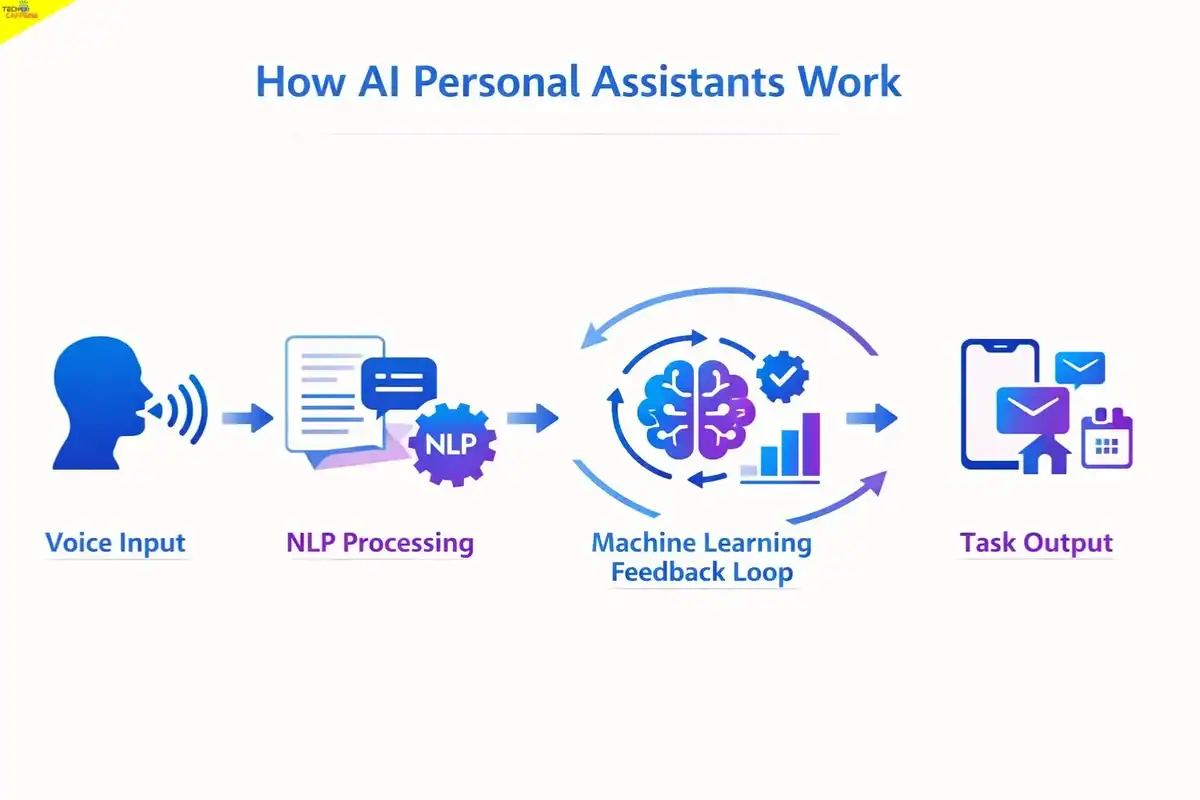
An AI personal assistant is software that interprets natural language – spoken or typed – and completes tasks, answers questions, or retrieves information on behalf of the user. These tools are built on large language models (LLMs) and NLP engines that analyze the intent behind a request, not just the literal words.
Here’s the basic process behind every interaction:
- Input capture – The assistant receives a voice command (converted to text via speech recognition) or a typed query.
- Intent analysis – NLP algorithms identify what the user wants: a reminder, a search result, a document summary, etc.
- Context matching – The assistant checks prior conversation history, connected accounts, and user preferences to personalize the response.
- Task execution – It either retrieves information, triggers an app action (sending a message, playing music, controlling a device), or generates a response.
- Learning loop – Machine learning models update based on interaction patterns, gradually improving accuracy for that user.
Understanding what a large language model is helps clarify why modern assistants have become so much more capable – today’s tools are built on models trained on vast datasets, enabling nuanced, context-aware responses that earlier rule-based systems couldn’t produce.
The key difference between assistants in 2026 versus 2020 is depth. Earlier tools were good at discrete commands (“Set a timer for 10 minutes”). Current assistants handle multi-step reasoning, document analysis, code generation, and extended conversations without losing context.
What Are the Best AI Personal Assistants in 2026?
The 10 best AI personal assistants in 2026 are listed below, evaluated across capability, platform availability, privacy, integration depth, and real-world usability. Each entry includes a verdict on who it’s best suited for.
1. Siri – Apple’s Built-In Assistant
Best for: iPhone, iPad, Mac, Apple Watch, and HomePod users who want a privacy-conscious, deeply integrated assistant.
Siri remains Apple’s primary AI interface across all its hardware. In 2026, Apple has significantly upgraded Siri’s on-device processing through Apple Intelligence, reducing how much data leaves the device and improving response speed. It’s not the most capable assistant for complex reasoning tasks, but it’s the most tightly woven into the Apple ecosystem.
Core capabilities:
- Voice-activated calls, texts, and emails – fully hands-free
- Calendar management, reminders, and alarms
- Smart home control via HomeKit-compatible devices
- Navigation through Apple Maps with real-time traffic
- Music, podcasts, and media playback across Apple services
- Sports scores, weather, and general knowledge queries
- App shortcuts and device settings control
Standout feature: Siri’s on-device processing means sensitive requests (messages, health data, contacts) are handled locally without being sent to Apple’s servers – a meaningful privacy advantage over cloud-first competitors.
Limitations: Siri still struggles with complex, multi-step queries and doesn’t match ChatGPT or Claude for tasks involving writing, analysis, or extended reasoning. Its usefulness drops sharply outside the Apple ecosystem.
Choose Siri if: You use Apple devices exclusively and prioritize privacy and seamless hardware integration over advanced AI capabilities.
2. Google Assistant – Google’s Conversational AI
Best for: Android users, Google Workspace subscribers, and anyone who wants the most accurate real-time information retrieval.
Google Assistant draws directly on Google Search’s index, which gives it a significant edge for factual queries, local business information, and real-time data like flight status or sports scores. It’s available on Android phones, Nest smart speakers, Chromebooks, and Android-compatible smart TVs.
Core capabilities:
- Voice search with real-time, search-engine-grade accuracy
- Google Workspace integration (Gmail, Calendar, Drive, Meet)
- Smart home control across thousands of compatible devices
- Multilingual support covering 40+ languages
- Routines automated sequences triggered by a single command
- Cross-device continuity (start a task on your phone, continue on a speaker)
Standout feature: Google Assistant’s Routines allow users to chain multiple actions together. Saying “Good morning” can simultaneously turn on lights, read the day’s calendar, report traffic, and start a playlist – all in one command.
Limitations: Google Assistant requires a consistent internet connection for most functions. Privacy-conscious users may be uncomfortable with the volume of behavioral data Google collects to personalize responses.
Choose Google Assistant if: You’re on Android, use Google’s productivity suite, or need the most accurate real-world information retrieval available in a voice assistant.
3. Amazon Alexa – The Smart Home Standard
Best for: Smart home enthusiasts and Amazon ecosystem users who want broad device compatibility and voice-controlled shopping.
Alexa, built into Amazon Echo devices and thousands of third-party products, has the widest smart home device compatibility of any assistant on this list. With over 100,000 skills available (as of early 2026, per Amazon’s developer documentation), it’s also the most extensible through third-party add-ons.
Core capabilities:
- Smart home control (lights, locks, thermostats, cameras, plugs)
- Amazon shopping – add to cart, reorder, and track packages by voice
- Music streaming via Amazon Music, Spotify, Apple Music, and others
- Skills marketplace for third-party functionality
- Multi-room audio across Echo devices
- Drop-in calling and intercom between Echo devices
- Routines and scheduled automations
Standout feature: Alexa Guard can detect sounds like smoke alarms or breaking glass when you’re away and send alerts to your phone – a genuinely useful home security layer that most competitors don’t offer.
Limitations: Alexa’s general knowledge and conversational depth on the free tier lag behind Google Assistant and ChatGPT. However, Amazon’s newly launched “Alexa+” tier ($19.99/mo) introduces a highly capable LLM that significantly improves conversational depth and real-time web capabilities.
Choose Alexa if: Smart home control is your primary use case, or you’re a heavy Amazon shopper who wants voice-activated ordering and delivery tracking.
4. Microsoft Copilot – The Productivity Powerhouse
Best for: Microsoft 365 users, enterprise professionals, and Windows users who want AI deeply embedded in their daily work tools.
Microsoft Copilot (formerly Cortana, now significantly more capable) is integrated directly into Windows 11, Microsoft 365 apps, and the Edge browser. Powered by OpenAI’s GPT-4 architecture, it handles document drafting, email summarization, meeting transcription, and data analysis inside the apps where work actually happens.
Core capabilities:
- Draft, edit, and summarize documents in Word
- Generate formulas, analyze data, and create charts in Excel
- Build presentation outlines and slide content in PowerPoint
- Summarize email threads and draft replies in Outlook
- Meeting summaries and action items in Teams
- Web search with cited sources in Edge
- Windows system control via voice or text
Standout feature: Copilot in Teams can join a meeting, transcribe the conversation, identify action items, and produce a structured summary – without any manual note-taking required.
Limitations: Limitations: Full Copilot functionality requires a subscription. The consumer-focused Copilot Pro is $20/month, while the enterprise-grade Copilot for Microsoft 365 license is $30/user/month. Outside the Microsoft ecosystem, its utility is limited.
Choose Copilot if: You spend most of your workday inside Microsoft 365 apps and want AI that operates within those tools rather than alongside them.
5. Samsung Bixby – The Samsung Ecosystem Assistant
Best for: Samsung Galaxy device users who want deep hardware control and SmartThings smart home integration.
Bixby is Samsung’s native AI assistant, available on Galaxy smartphones, tablets, wearables, and smart TVs. Its primary strength is device-level control – Bixby can adjust settings, navigate apps, and execute multi-step device actions that general-purpose assistants can’t access.
Core capabilities:
- Full device control (settings, accessibility features, app navigation)
- SmartThings integration for Samsung smart home devices
- Quick Commands – custom voice triggers that execute multiple actions at once
- Bixby Vision – real-time camera-based translation, object recognition, and QR scanning
- Bixby Routines – automated device behavior based on time, location, or usage patterns
- Multi-language support across major global languages
Standout feature: Bixby’s Scene Describer (part of Bixby Vision) uses the camera to describe what’s on screen for visually impaired users – a meaningful accessibility feature that sets it apart from competitors.
Limitations: Bixby’s conversational AI capabilities are noticeably weaker than Google Assistant or ChatGPT for general knowledge queries. It’s a device control tool first, a conversational assistant second.
Choose Bixby if: You use Samsung Galaxy devices and want an assistant that can control every aspect of your hardware, not just answer questions.
6. ChatGPT – The Versatile AI Powerhouse
Best for: Writers, researchers, developers, students, and anyone who needs a capable conversational AI for complex, open-ended tasks.
ChatGPT, developed by OpenAI, is the most widely used AI assistant in the world as of 2026. Unlike device-native assistants, ChatGPT is platform-agnostic – accessible via browser, iOS, Android, and API. The free tier runs on GPT-4o; the Plus tier ($20/month) adds faster responses, image generation via DALL-E, and access to advanced reasoning models.
Core capabilities:
- Long-form writing, editing, and summarization
- Code generation and debugging across major programming languages
- Research assistance with web browsing (Available on Free and Plus tiers)
- Image generation and analysis
- Document upload and analysis (PDFs, spreadsheets, Word files)
- Custom GPTs for specialized use cases
- Voice mode for natural spoken conversation (Advanced Voice now available on Free and Plus)
Standout feature: ChatGPT’s memory feature (available on Plus) allows it to remember details about the user across sessions preferred writing style, ongoing projects, personal context creating a genuinely personalized experience over time.
Limitations: ChatGPT doesn’t control device hardware or smart home systems. It’s a text and reasoning tool, not a device-integrated assistant. The free tier has usage limits during peak hours.
Choose ChatGPT if: You need a capable AI for writing, research, coding, or analysis – and you want a tool that works across all your devices without being tied to one ecosystem.
7. Google Gemini – Google’s Advanced AI Assistant
Best for: Google power users who want a capable LLM-based assistant integrated with Google Workspace and Search.
Google Gemini (formerly Bard) is Google’s answer to ChatGPT – a multimodal AI assistant that handles text, images, code, and audio. Gemini Advanced (available through Google One AI Premium at $19.99/month) runs on Google’s most capable model and integrates directly with Gmail, Docs, Drive, and YouTube.
Core capabilities:
- Multimodal input – analyze images, audio, and text together
- Gmail integration – draft emails, summarize threads, extract action items
- Google Docs integration – write, edit, and restructure documents
- Smart home control via Google Home extensions
- Real-time web access for up-to-date information
- Code generation and explanation
- Deep research mode for multi-source synthesis
- Available in 40+ languages
Standout feature: Gemini’s Deep Research feature can autonomously browse multiple sources, synthesize findings, and produce a structured research report – a significant time-saver for professionals and students.
Limitations: Gemini Advanced requires a paid Google One subscription. The free tier is capable but slower and lacks Workspace integration.
Choose Gemini if: You’re already in the Google ecosystem and want an LLM-based assistant that works inside Gmail and Docs rather than as a separate tool.
8. Claude – The Research and Writing Specialist
Best for: Professionals, researchers, and writers who prioritize nuanced reasoning, long document analysis, and careful, accurate responses.
Claude, developed by Anthropic, has built a reputation for producing thoughtful, well-structured responses with a lower rate of confident-sounding errors than some competitors. Claude 3.5 and later versions support extremely long context windows – meaning it can analyze entire books, lengthy contracts, or large codebases in a single session.
Core capabilities:
- Long-form document analysis (up to 200,000 tokens of context)
- Voice mode for hands-free spoken conversations via the mobile app
- Nuanced writing with strong structural and stylistic awareness
- Code review and generation
- Data extraction from uploaded documents
- Careful handling of sensitive or complex topics
- Available via browser, iOS, Android, and API
Standout feature: Claude’s extended context window makes it the best choice for tasks involving large documents – legal contracts, academic papers, lengthy reports – where other assistants hit limits and lose track of earlier content.
Limitations: Claude doesn’t have real-time web access on the free tier and lacks native smart home or device integration. It’s a reasoning and writing tool, not a voice-activated device assistant.
Choose Claude if: Your work involves analyzing long documents, drafting carefully reasoned content, or handling tasks where accuracy matters more than speed.
9. Perplexity AI – The Research-First Assistant
Best for: Researchers, journalists, students, and anyone who needs cited, real-time information rather than general conversation.
Perplexity AI functions as an AI-powered answer engine – it searches the web in real time, synthesizes results from multiple sources, and provides answers with inline citations. This makes it significantly more trustworthy for factual queries than assistants that rely on static training data.
Core capabilities:
- Real-time web search with cited sources
- Voice mode via the mobile app for aural queries and transcriptions
- Follow-up questions within the same thread for deeper exploration
- File and image upload for analysis
- Focus modes (Academic, YouTube, Reddit, etc.) to search specific source types
- Perplexity Pages – structured research documents generated from a query
- Available on web, iOS, and Android
Standout feature: Every Perplexity response includes numbered citations linking directly to source pages. For anyone who needs to verify information or build on reliable sources, this is a fundamental advantage over assistants that generate answers without attribution.
Limitations: Perplexity is not a task-execution assistant – it won’t set reminders, control devices, or manage your calendar. It’s purely an information retrieval and synthesis tool.
Choose Perplexity if: You frequently need accurate, sourced answers to factual questions and want to verify claims rather than trust a black-box response.
10. Notion AI – The Productivity Workspace Assistant
Best for: Teams and individuals who use Notion as their primary workspace and want AI embedded directly in their notes, wikis, and project management.
Notion AI is built directly into the Notion workspace, meaning it operates on your actual documents, meeting notes, and databases – not on generic training data alone. It’s less of a standalone assistant and more of an AI layer on top of an existing productivity tool.
Core capabilities:
- Summarize meeting notes, pages, and databases
- Draft content directly inside Notion pages
- Translate text across languages
- Generate action items from unstructured notes
- Answer questions based on your Notion workspace content
- Improve, shorten, or reformat existing writing
Standout feature: Notion AI can answer questions using your own workspace as the knowledge base – asking “What did we decide in last month’s product meeting?” returns an answer pulled from your actual notes, not a generic response.
Limitations: Notion AI is only useful if Notion is already your primary workspace. It has no voice interface, no smart home integration, and no real-time web access.
Choose Notion AI if: Your team runs on Notion and you want AI that understands your specific projects, documents, and organizational context.
How Do These AI Assistants Compare Side by Side?
AI Assistants & Platforms Comparison
Updated capabilities and pricing tiers across major AI ecosystems.
Assistant | Best Platform | Smart Home | Real-Time Web | Voice Interface | Free Tier | Paid Tier |
|---|---|---|---|---|---|---|
| Siri | Apple | Yes (HomeKit) | Limited | Yes | Yes (built-in) | N/A |
| Google Assistant | Android/Google | Yes (broad) | Yes | Yes | Yes | N/A |
| Alexa | Echo/Amazon | Yes (widest) | Yes | Yes | Yes (built-in) | $19.99/mo (Alexa+) |
| Microsoft Copilot | Windows/M365 | No | Yes | Yes | Yes | $20/mo (Pro) $30 (M365) |
| Bixby | Samsung | Yes (SmartThings) | Limited | Yes | Yes (built-in) | N/A |
| ChatGPT | Cross-platform | No | Yes (Free & Plus) | Yes (Free & Plus) | Yes | $20/mo (Plus) |
| Google Gemini | Cross-platform | Yes (via Home) | Yes | Yes | Yes | $19.99/mo (Advanced) |
| Claude | Cross-platform | No | Limited | Yes (App Voice) | Yes | $20/mo (Pro) |
| Perplexity AI | Cross-platform | No | Yes | Yes (App Voice) | Yes | $20/mo (Pro) |
| Notion AI | Notion workspace | No | No | No | Add-on | $10/mo |
Which AI Personal Assistant Is Best for Productivity?
For pure productivity, Microsoft Copilot leads for office workers inside the Microsoft 365 ecosystem, while ChatGPT and Claude are stronger for independent professionals, writers, and researchers.
The most productive setup in 2026 isn’t choosing a single assistant – it’s combining tools by use case:
- Device control and scheduling: Siri, Google Assistant, or Alexa
- Writing and analysis: ChatGPT or Claude
- Research with citations: Perplexity AI
- Workspace-specific tasks: Copilot (Microsoft) or Notion AI
Pairing any of these with AI-powered calendar tools creates a more complete productivity system, particularly for managing complex schedules across multiple projects.
A common mistake is expecting one assistant to do everything well. Device-native assistants (Siri, Alexa, Google Assistant) are optimized for quick, command-based interactions. LLM-based tools (ChatGPT, Claude, Gemini) are optimized for depth and reasoning. Using the right tool for the right task produces better results than forcing one assistant to handle everything.
What Should You Look for When Choosing an AI Personal Assistant?
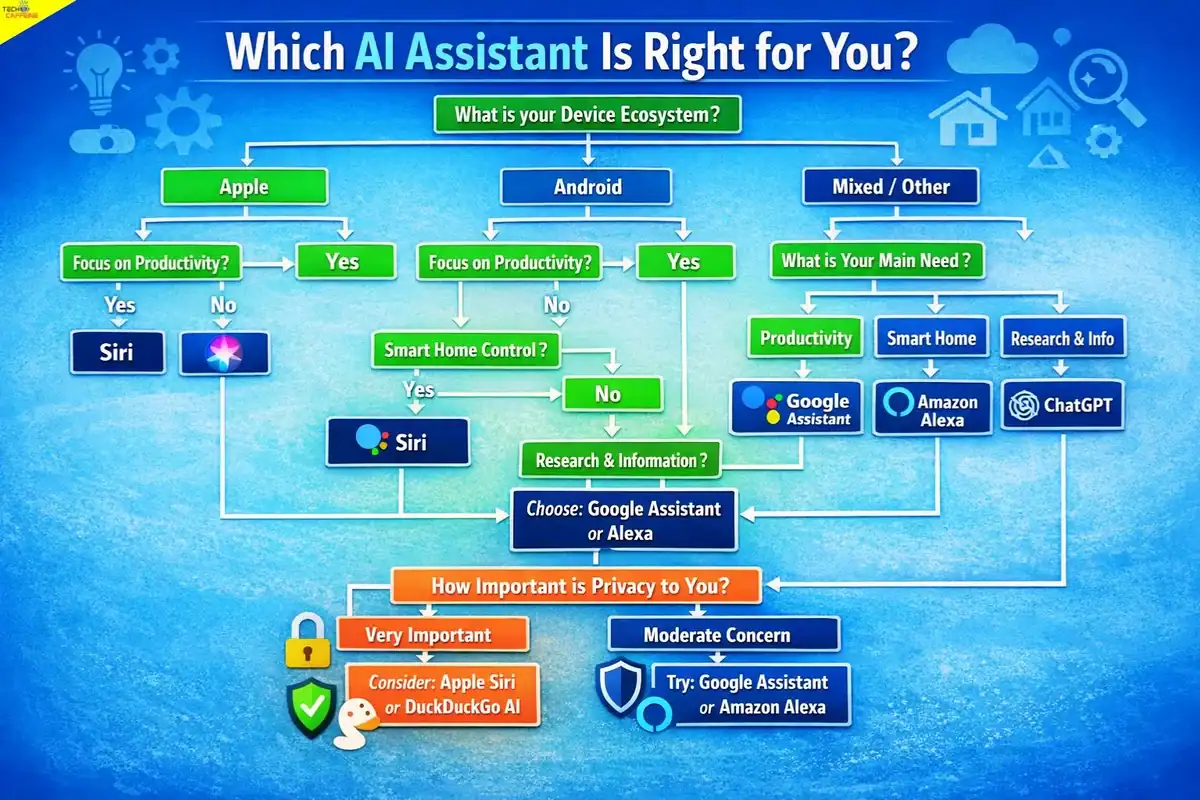
The right AI assistant depends on five factors: ecosystem fit, primary use case, privacy requirements, budget, and integration needs.
Ecosystem fit is the most important starting point. If you use an iPhone, Siri will always have deeper hardware access than any third-party tool. If you run Windows and Microsoft 365, Copilot is embedded where you already work. Fighting your ecosystem usually creates friction rather than reducing it.
Primary use case determines which capability set matters most:
- Smart home control → Alexa or Google Assistant
- Office productivity → Microsoft Copilot
- Writing and research → ChatGPT, Claude, or Perplexity
- Device control → Siri or Bixby (within their respective ecosystems)
Privacy requirements vary significantly. Siri’s on-device processing is the most conservative option. Cloud-dependent tools like Google Assistant and Alexa process data on remote servers, which enables more powerful features but involves data sharing. Review each platform’s privacy policy before using an assistant for sensitive personal or professional information.
Budget is straightforward. Device-native assistants (Siri, Google Assistant, Alexa, Bixby) are free. LLM-based tools offer free tiers with meaningful limitations; paid tiers typically run $10–$20/month and unlock faster models, higher usage limits, and advanced features.
Integration needs – consider which apps and services you use daily. An assistant that connects to your calendar, email, and project management tools provides more value than one that operates in isolation.
What Are the Privacy Risks of Using AI Personal Assistants?
AI personal assistants collect varying amounts of data, and understanding the differences matters – especially for users handling sensitive personal or professional information.
Data collection by category:
- Voice recordings: Most voice assistants (Alexa, Google Assistant, Siri) record and may store voice clips to improve accuracy. All three offer settings to delete recordings and opt out of human review.
- Behavioral data: Google Assistant and Alexa build detailed usage profiles that inform personalization and advertising. Siri limits this through on-device processing.
- Conversation history: LLM-based tools (ChatGPT, Claude, Gemini) store conversation history by default. Most offer options to disable history or delete past sessions.
- Third-party sharing: Skills and integrations (particularly on Alexa) may share data with third-party developers. Review permissions before enabling third-party skills.
Practical privacy steps:
- Regularly review and delete voice history in each assistant’s app settings.
- Disable conversation history for LLM tools when discussing sensitive topics.
- Use Siri for queries involving health, financial, or personal data if privacy is a priority.
- Avoid enabling third-party skills or integrations that request access to contacts, location, or financial accounts unless the developer is clearly trustworthy.
What Is the Future of AI Personal Assistants?
AI personal assistants are moving from reactive tools (answering questions when asked) to proactive agents (taking action on your behalf without being prompted). Several developments are shaping the next phase:
Agentic AI – Tools like ChatGPT’s Operator feature and Google’s Project Astra are designed to complete multi-step tasks autonomously: booking appointments, filling out forms, managing files, and interacting with websites on the user’s behalf. This shifts the assistant from a Q&A tool to an autonomous workflow executor.
Multimodal interaction – Assistants increasingly process text, voice, images, video, and documents simultaneously. A user can point a phone camera at a document and ask questions about it, or describe a visual problem and receive a structured solution.
On-device AI – Apple’s Apple Intelligence and similar initiatives from Google and Qualcomm are pushing more AI processing onto the device itself, reducing latency and improving privacy. This trend will accelerate as chip capabilities improve.
Deeper app integration – Rather than operating as separate apps, AI assistants are embedding directly into the tools people already use – email clients, browsers, code editors, design software. The assistant becomes invisible infrastructure rather than a standalone product.
For a broader perspective on how AI is developing across industries, the artificial intelligence category covers emerging tools, research, and practical applications worth following.
Frequently Asked Questions
Which AI personal assistant is the most capable in 2026?
For general-purpose tasks, ChatGPT (GPT-4o) and Google Gemini Advanced are the most capable in terms of reasoning, writing, and multimodal understanding. For device control and smart home management, Google Assistant and Alexa lead. “Most capable” depends entirely on the task.
Is Siri better than Google Assistant?
Siri is better for Apple device users who prioritize privacy and hardware integration. Google Assistant is better for Android users, Google Workspace subscribers, and anyone who needs more accurate real-time information retrieval. Neither is universally superior – ecosystem fit is the deciding factor.
Can AI personal assistants work without an internet connection?
Most AI assistants require an internet connection for the majority of their features. Siri handles some basic on-device tasks (timers, alarms, device settings) offline. Alexa and Google Assistant are almost entirely cloud-dependent. LLM-based tools (ChatGPT, Claude) require connectivity for all functions.
Are AI personal assistants safe to use for sensitive information?
With caution, yes. Avoid sharing financial account numbers, passwords, or highly sensitive personal data with any AI assistant. For sensitive queries, Siri’s on-device processing is the most privacy-protective option among mainstream assistants. For LLM tools, disable conversation history when discussing sensitive topics.
What is the difference between an AI assistant and an AI chatbot?
AI assistants are designed to take actions – controlling devices, setting reminders, sending messages, managing calendars. AI chatbots are primarily conversational – answering questions and generating text. The distinction is blurring in 2026, as tools like ChatGPT add action-taking capabilities (browsing, file management, app control) alongside conversation.
Do AI personal assistants cost money?
Device-native assistants (Siri, Google Assistant, Alexa, Bixby) are free, though Amazon now offers a $19.99/mo Alexa+ premium tier. LLM-based tools offer free tiers with limitations; paid plans typically cost $10–$20/month. Microsoft Copilot offers a $20/mo Pro tier and a separate $30/mo enterprise tier.
Which AI assistant is best for smart home control?
Amazon Alexa has the widest device compatibility across smart home brands. Google Assistant is a close second and integrates well with Google Nest devices. Apple HomeKit (controlled via Siri) works best within the Apple ecosystem but has fewer compatible third-party devices than Alexa.
Can AI personal assistants help with work tasks?
Yes, particularly Microsoft Copilot (for Microsoft 365 users), ChatGPT, Claude, and Google Gemini. These tools draft documents, summarize meetings, analyze data, generate code, and handle research tasks. Device-native assistants like Siri and Alexa are less suited for complex professional work.
Which AI assistant is best for research?
Perplexity AI is the strongest choice for research requiring cited, verifiable sources. Claude handles long document analysis better than most competitors. ChatGPT with web browsing enabled is a strong all-rounder for research tasks.
Is there an AI assistant that remembers past conversations?
ChatGPT Plus has a memory feature that retains user preferences and context across sessions. Claude and Gemini offer conversation history but with less persistent personalization. Device-native assistants like Siri and Google Assistant retain some preferences but don’t maintain detailed conversational memory in the same way.

Shivakumar K Naik is an SEO Analyst and Technology Writer based in Mysore, Karnataka with 2.5+ years of experience and 28+ client success stories across FinTech, Travel, Automotive, SaaS and Education. He has delivered 150+ Google first-page rankings for brands like Mudrex, Decathlon and Maruti Suzuki. On Tech Caffeine, he writes practical, beginner-friendly guides on AI tools, how to make money online with AI, cryptocurrency, blockchain, NFTs, gaming and emerging technology content built from real SEO experience and daily hands-on use of ChatGPT, Claude, Ahrefs and Semrush.