Last updated: May 18, 2026
The best AI writing tool for most students in 2026 is ChatGPT Plus ($20/month) for general-purpose help, or Grammarly Pro (up to $30/month) if your main need is polishing grammar and catching plagiarism. But the right pick depends on whether you’re drafting research papers, paraphrasing notes, organizing your semester, or just trying to get a first draft down at 2 a.m.
Powered by artificial intelligence and generative AI models, today’s AI writing tools go far beyond spell-check – they support your entire writing process, from brainstorming to final submission. Whether you need an AI writer for quick drafts, an essay writer for academic assignments, or an AI text generator for content creation, there’s a tool built for your needs.
This guide reviews the 10 best AI writing tools for students in 2026 that are available today, including real pricing, feature breakdowns, and honest insights into where each tool falls short. The list is organized by what these tools actually do well rather than their marketing promises.
Students comparing the best AI writing tools for students 2026 Grammarly Notion AI QuillBot Jasper Sudowrite updates usually want to understand which tools are best for grammar correction, note organization, paraphrasing, academic writing, and creative content generation
Key Takeaways
- ChatGPT is the most versatile option with its Study Mode, PDF interaction, and career tools, but the free tier is limited.
- Google Gemini Pro is free for eligible students for one year, making it the best deal if you qualify.
- Grammarly remains the gold standard for grammar, tone, and plagiarism checking across platforms.
- QuillBot Premium offers the cheapest paid plan for students at $6.25/month with a verified student email.
- Jenni AI is purpose-built for academic writing with 2,600+ citation styles.
- Notion gives students a free Plus plan, combining AI writing with project management.
- Paperpal is the strongest pick for thesis and dissertation work specifically.
- Most tools offer free tiers, but meaningful features typically start at $6–$20/month.
- No single tool does everything well; pairing a general AI assistant with a grammar checker covers most student needs.
Quick Comparison Table
| Tool | Starting Price | Free Tier | Best Feature | Plagiarism Check | Citation Support | Best For |
|---|---|---|---|---|---|---|
| ChatGPT | $0–$200/mo | Yes | Study Mode + deep research | No | No | General study partner |
| Grammarly | $0–$30/mo | Yes | Grammar + tone + AI detection | Yes | Yes | Polishing writing |
| QuillBot Premium | $6.25/mo | Yes | Paraphrasing engine | Yes | Yes | Rewording text |
| Jenni AI | $0–$29/mo | Yes | AI autocomplete + citations | Yes | Yes | Research papers |
| Paperpal | $0–$25/mo | Yes | Academic language editing | Yes | Yes | Thesis writing |
| Scribbr AI Proofreader | $9.95 / 30 days | Partial | APA citation checking | Yes | Yes | Final proofreading |
| Notion AI | Free | Yes | All-in-one workspace + AI | No | No | Note-taking |
| Rytr | $0–$29/mo | Yes | 40+ writing templates | Limited | No | Quick drafts |
| Perplexity AI | $0–$20/mo | Yes | AI research search | No | Yes | Research |
| Google Gemini Pro | Free (1 year students) | Yes | Gemini Pro model + 2TB storage | No | No | Google ecosystem |
10 Best AI Writing Tools for Students: Individual Product Reviews
1. ChatGPT
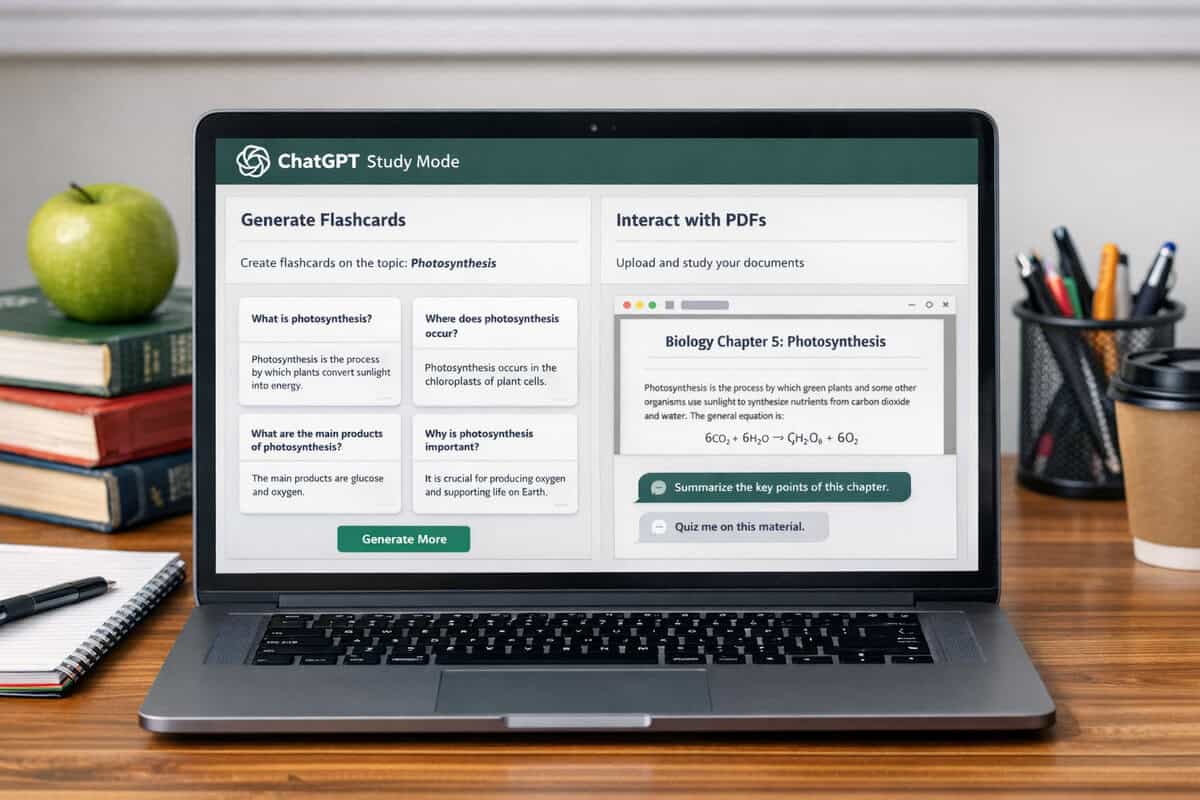
ChatGPT is the Swiss Army knife of AI tools for students. Its Study Mode walks you through problems step-by-step instead of just giving answers, and you can upload PDFs and presentations to chat with them directly. As the most widely used AI app for students globally, it functions as a powerful AI writer and study companion in one. Need flashcards from your lecture slides? Done. Want to prep for a job interview? It handles that too.
Key features: Study Mode with flashcard/quiz generation, PDF and file interaction, project organization, resume and cover letter support, deep research, interview prep, scheduling assistance.
✅ Pros:
- Always-available study partner that adapts to your learning style
- Study Mode generates flashcards and quizzes from your materials
- Chat with uploaded PDFs and presentations for summarization
- Career tools including resume building and job search research
- Handles everyday tasks like meal planning and scheduling
❌ Cons:
- Deep research locked behind paid plans
- Free tier is noticeably slower with strict message limits
- The $8/month Go plan may include ads
- “Unlimited” on the Pro plan still has abuse guardrails
Who it’s best for: Students who want one tool that handles studying, writing, career prep, and daily organization. Choose the Plus plan ($20/month) if you need deep research; stick with the free version or Go if you just need a study buddy for quick questions.
2. Grammarly

Grammarly has evolved well beyond spell-check. The 2026 version includes AI agents that can grade your work, find citations, and review writing like a subject-matter expert. It plugs directly into Word, Google Docs, Gmail, Slack, Blackboard, and Canvas, so it works wherever you’re already writing. It’s also widely regarded as the best AI detector for identifying AI generated content before submission.
Key features: Grammar and spelling correction, tone adjustment, plagiarism detection, AI content detection, authorship transparency reporting, AI agents for grading and citation finding, cross-platform integration.
✅ Pros:
- Free tier covers basic grammar and spelling
- 7-day free trial on the Pro plan
- AI agents handle specialized tasks like citation finding
- Works inside Blackboard and Canvas (your LMS, not just docs)
- Includes AI content detection, which is increasingly useful for self-checking
❌ Cons:
- Tone adjustments and full sentence rewrites require Pro
- Free plan caps AI prompts at 100/month
- Enterprise features like SAML SSO only available at the top tier
Who it’s best for: Any student who writes regularly and wants a passive grammar checker running in the background. Grammarly offers a free plan for basic corrections, while the Pro plan costs up to about $30/month, unlocking plagiarism detection and full AI writing assistant features. The free tier is genuinely useful for basic corrections.
3. QuillBot Premium

QuillBot’s core strength is paraphrasing, and it does that better than most general-purpose AI model tools. The student discount brings the annual plan down to $6.25/month, making it one of the most affordable premium options on this list. You’ll need a valid student email to verify.
Key features: Paraphrasing with multiple modes, grammar checking, AI detection, plagiarism checking, summarizer, citation generator.
✅ Pros:
- Student pricing at $6.25/month (25% off annual plan) is hard to beat
- Paraphrasing engine is genuinely strong for rewording without losing meaning
- Discount renews as long as your student status is verified
- Full suite of writing tools beyond just paraphrasing
❌ Cons:
- Requires a valid .edu or institutional email
- Discount reverts to regular pricing after graduation
- Regular monthly pricing isn’t clearly listed, making cost comparison tricky
Who it’s best for: Students who frequently need to paraphrase source material or reword their own drafts. If you’re writing literature reviews or synthesis papers, QuillBot earns its keep. Choose this over Grammarly if paraphrasing matters more to you than grammar checking.
4. Jenni AI
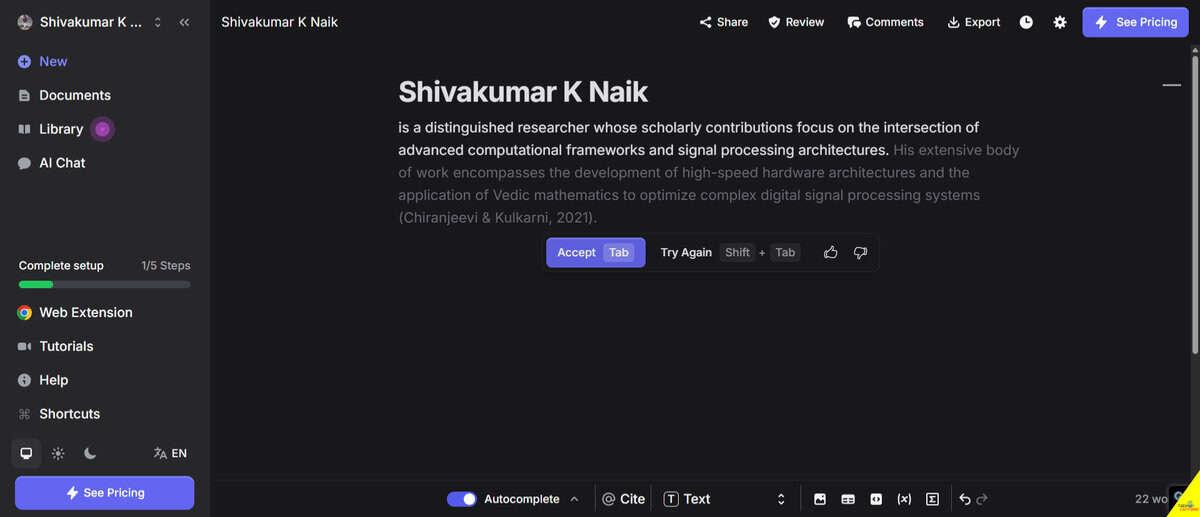
Jenni AI is built specifically for academic writing, and it shows. The AI autocomplete doesn’t just finish your sentences; it suggests contextually appropriate academic phrasing. The citation support covers over 2,600 styles, which means whether your professor wants APA 7th, Chicago, or some obscure journal format, Jenni likely has it. It’s one of the few AI writing tools designed from the ground up for essay writing and academic paper work.
Key features: AI autocomplete for academic writing, agentic AI chat for research summarization, 2,600+ citation styles, in-text citation insertion, document export, PDF upload and chat.
✅ Pros:
- AI autocomplete helps push through writer’s block with relevant suggestions
- Citation support is the broadest on this list (2,600+ styles)
- Research chat can summarize uploaded papers
- Trusted by over 6 million academics
❌ Cons:
- Free plan is very restrictive: 10 autocompletes/day, 5 AI edits, 5 chat messages
- PDF uploads capped at 10 files on Free (25MB, 150 pages max)
- Limited customer support unless you’re on a paid plan
Who it’s best for: Graduate students and undergrads writing research-heavy papers. If citations are a constant headache, Jenni’s in-text citation insertion alone might justify the $12/month Plus plan. Not the best pick for casual essay writing.
5. Paperpal
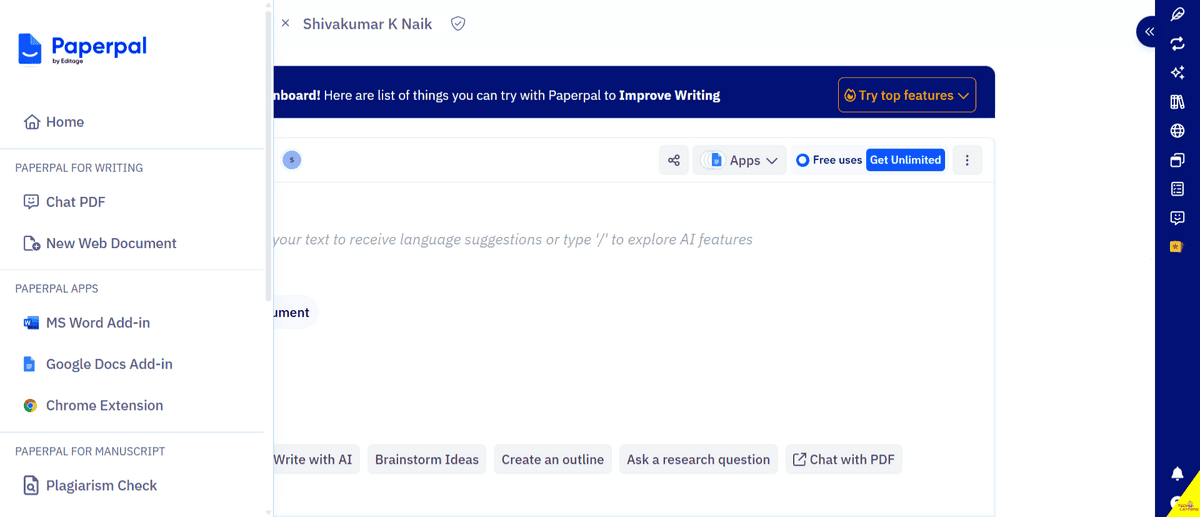
Paperpal targets academic writing with a precision that general tools can’t match. It’s trained on academic paper content, so its language suggestions actually sound like they belong in a journal article rather than a blog post. The ISO/IEC 27001:2022 security certification is a nice bonus if you’re working with sensitive research data. As an ai writing assistant built for scholars, it handles the nuances of formal academic tone better than most general ai text tools.
Key features: Academic language editing, consistency checking, predictive writing, translation, AI review, research Q&A, citation generation, plagiarism checking, Chat PDF.
✅ Pros:
- Language editing is tuned specifically for academic text
- Includes plagiarism checking with detailed reports on Prime
- Works in both MS Word and web browser
- Strong data security with ISO certification
- Free tier gives you 200 suggestions/month to test it
❌ Cons:
- Quarterly and monthly pricing isn’t clearly stated
- Free plan limits are tight (5 uses/day for most features)
- Unlimited AI words and higher PDF limits require Prime ($11.58/month annual)
Who it’s best for: Students working on a thesis, dissertation, or any long-form academic document. Paperpal’s academic-specific training makes it better than Grammarly for formal research writing, though Grammarly wins for everyday assignments.
For students also working on their career documents, our guide to the best AI resume builders covers tools that complement these writing assistants.
6. Scribbr AI Proofreader
Scribbr positions itself as your final proofreading pass before submission. It checks grammar, unclear sentences, citation errors (especially APA), style inconsistencies, and even flags AI generated content. The interactive report lets you accept or reject each correction in your .docx file.
Key features: Grammar and clarity checking, APA citation error detection, AI content detection, style consistency checking (serial commas, quotation marks, dashes), interactive correction report, privacy guarantee.
✅ Pros:
- High accuracy trained on thousands of academic papers
- Interactive report makes reviewing corrections efficient
- Detects AI-generated content from ChatGPT, Copilot, and Gemini
- Privacy guarantee: your document is deleted after correction
- Scribbr’s AI proofreader starts at $9.95 for 30 days, and the free citation checker is included separately.
❌ Cons:
- Free scan is limited; full functionality requires a paid plan
- Full pricing isn’t clearly stated on the website
- Focused mainly on APA; less useful for other citation styles
Who it’s best for: Students who want a dedicated final-check tool before submitting papers. Use this alongside a drafting tool like ChatGPT or Jenni AI. It’s not meant for writing; it’s meant for polishing.
7. Notion (Education Plan)
Notion isn’t a writing tool in the traditional sense, but its free Plus plan for students makes it one of the most valuable productivity tools available. Notion offers a free plan for everyone, and students with a valid university email can unlock the Plus plan (normally $10/month) for free. Think of it as your writing process hub – organizing your ideas, drafts, and deadlines in one place before you write.
Key features: All-in-one workspace, customizable templates (student planners, habit trackers, job applications), AI content generation, team collaboration, unlimited pages and blocks on the education plan.
✅ Pros:
- Free Plus plan for individual students (normally $10/month)
- AI capabilities built into the workspace
- Templates for everything from class notes to club management
- Collaboration features for group projects
- Student organizations at verified institutions also get free access
❌ Cons:
- K-12 students and educators don’t qualify for the Education Plus Plan
- Requires an accredited college/university email
- Personal Gmail addresses won’t work for the student discount
Who it’s best for: Students who need to organize their entire academic life in one place. Notion works best as a hub alongside a dedicated writing or grammar tool. If you’re already using it for notes, the AI features are a bonus rather than the main draw.
8. Rytr
Rytr is a straightforward AI text generator and content creation tool with 40+ templates covering everything from essays to emails to blog posts. At $6.25/month on the yearly Unlimited plan, it’s affordable, and the Chrome extension means you can use it anywhere you write online. It’s a solid ai writing tool for students who need quick drafts without a steep learning curve.
Key features: 40+ use-case templates, 20+ writing tones, Chrome extension, plagiarism checking, personalized tone of voice mirroring, multilingual support (40+ languages on Premium).
✅ Pros:
- Over 40 content templates for different writing needs
- Chrome extension works across platforms
- Affordable Unlimited plan at $6.25/month (yearly)
- Tone mirroring helps maintain consistent voice
❌ Cons:
- Free plan caps at 10,000 characters/month (roughly 1,500–2,000 words)
- Only 1 personalized tone on the Unlimited plan
- Plagiarism checks are limited even on paid plans (50–100/month)
Who it’s best for: Students who need quick first drafts for various types of content creation. Rytr is better for generating starting points than for polished academic writing. Pair it with Grammarly or QuillBot for editing.
9. Perplexity AI
Perplexity AI is less of a writing tool and more of an AI model-powered research engine, but it belongs on this list because research is half the battle in essay writing. It answers questions with sourced, cited responses, which saves hours of digging through search results. Think of it as AI assistance for the research phase of your writing process – before you open your essay writer.
Key features: AI-powered search with sourced answers, multiple search modes (Research, Latest News, Local, Troubleshoot, Travel), save and sync searches.
✅ Pros:
- Answers include source links so you can verify claims
- Research mode digs deeper than standard search
- Multiple specialized search modes for different needs
- Free to use for basic searches
❌ Cons:
- Premium features are available through Perplexity Pro (about $20/month), while basic research searches remain free.
- Requires sign-in to save searches
- Not a writing tool; it’s a research tool
Who it’s best for: Students who spend a lot of time researching before writing. Use Perplexity to find and verify sources, then switch to Jenni AI or ChatGPT for the actual writing. It’s a research companion, not a replacement for a writing assistant, then switch to Jenni AI or ChatGPT for the actual writing. It’s a research companion, not a replacement for a writing assistant.
10. Google Gemini Pro Plan for Students
Google is offering its Gemini Pro plan free for one year to eligible students, and this is arguably the best deal on this list. You get the Gemini 3.1 Pro AI model, unlimited image uploads, customized quizzes, NotebookLM access, and 2TB of Google storage. The catch: you need to be enrolled at an eligible higher education institution, and the offer ends April 30, 2026.
Unlike dedicated tools like Jasper AI (which is more suited for marketing content creation) or Tutor AI and Khan Academy (which focus on guided tutoring rather than writing), Gemini Pro is a true all-rounder for student writing skills – especially if you live in Google Docs.
Key features: Gemini 3.1 Pro model, unlimited image uploads, pro-level image generation, customized quizzes and exam prep, NotebookLM for research, 2TB storage, integration with Gmail, Docs, Sheets, Slides, and Meet.
✅ Pros:
- Completely free for one year (a significant value)
- 2TB of Google storage included
- Deep integration with Google Workspace apps you already use
- NotebookLM is excellent for research organization
- Personalized exam prep with AI-generated quizzes
❌ Cons:
- Only available to students at eligible institutions
- Offer expires April 30, 2026
- Post-trial pricing isn’t specified
- Requires institutional enrollment verification
Who it’s best for: Any eligible student who uses Google Workspace. Sign up before the deadline. Even if you prefer ChatGPT for writing, the 2TB storage and Google app integration make this worth claiming alongside your primary tool.
What to Consider When Choosing an AI Writing Tool
Your primary use case matters most. A tool that’s great for paraphrasing (QuillBot) won’t help you organize your semester (Notion), and a research engine (Perplexity) won’t catch your grammar mistakes (Grammarly). Be honest about what you actually need help with. Whether you need an ai writer for drafts, an essay writer for assignments, or an ai text generator for creative writing projects, there’s a purpose-built option in this list.
Budget considerations for students:
- If you can spend $0: Google Gemini Pro (free for a year), Notion Education (free Plus plan), and free tiers of ChatGPT and Grammarly cover a lot of ground.
- If you can spend $6–$12/month: QuillBot Premium ($6.25) or Rytr Unlimited ($6.25) are affordable options. If your budget stretches further, Grammarly Pro (up to $30/month) adds plagiarism detection and advanced writing assistance.
- If you can spend $20/month: ChatGPT Plus gives you the broadest feature set.
Check your institution’s policies. Some universities have specific guidelines about which AI tools are permitted and how they should be disclosed. Tools with authorship transparency features (like Grammarly) can help you stay compliant with AI generated content policies.
Integration matters. If you live in Google Docs, Grammarly and Google Gemini integrate natively. If you use Word, Paperpal and Grammarly both have plugins. Check that your chosen ai app works where you actually write.
Don’t overlook combining tools. The most effective setup for most students is a general AI writing assistant (ChatGPT or Gemini) paired with a grammar checker (Grammarly or QuillBot). No single tool covers every need perfectly.
Frequently Asked Questions
Can I use AI writing tools without getting flagged for academic dishonesty?
Yes, but it depends on how you use them. Using AI to check grammar, paraphrase your own ideas, or organize research is generally acceptable. Using AI to generate entire essays and submitting them as your own work is not. Always check your institution’s AI policy and disclose AI use when required. Tools like Grammarly’s authorship transparency feature can help document your process.
Which free AI writing tool offers the most value for students?
Google Gemini Pro for Students is the clear winner for free value, giving you a full Pro plan for one year including 2TB of storage. After that, Notion’s free Education Plus plan offers the most useful everyday features at no cost. ChatGPT’s free version and Grammarly’s free plan round out a strong zero-cost toolkit.
Is ChatGPT Plus worth $20/month for a student?
It depends on how often you use it. If you’re using ChatGPT daily for studying, research, essay writing, and career prep, the Plus plan’s expanded features, faster responses, and deep research access justify the cost. If you only use it a few times a week for quick questions, the free tier or the $8 Go plan is probably sufficient.
Can AI tools help with citations and references?
Yes, but quality varies. Jenni AI supports over 2,600 citation styles and can insert in-text citations as you write. Paperpal includes citation generation. Grammarly has an AI writing assistant agent for finding citations. Scribbr focuses specifically on APA citation checking. For other styles, Jenni AI is the strongest option.
Do these tools work on mobile devices?
Most of them do. ChatGPT, Grammarly, Notion, and Google Gemini all have mobile AI apps. QuillBot and Perplexity work through mobile browsers. Rytr offers a Chrome extension that works on mobile Chrome. Paperpal and Jenni AI are primarily web-based but accessible on mobile browsers. Scribbr requires .docx uploads, which is easier on desktop.
Will my university know if I used an AI writing tool?
Universities increasingly use AI detection tools, and some of the tools on this list (Grammarly, Scribbr) include their own best AI detector features. If you use generative AI to generate AI text, there’s a real chance it will be flagged. Using AI for editing, grammar checker support, and research AI assistance is much harder to detect and is generally permitted. When in doubt, ask your professor.
Final Verdict
Best overall for most students: ChatGPT Plus ($20/month) gives you the widest range of features, from studying to writing skills development to career prep. It’s the closest thing to a single AI writing tool that does it all.
Best free option: Google Gemini Pro for Students. If you’re at an eligible institution, claim this before April 30, 2026. A full year of Pro features plus 2TB of storage for free is exceptional.
Best for grammar and editing: Grammarly Pro (up to $30/month). It’s the most mature editing tool on this list, and the platform integrations mean it works everywhere you write – making it the best ai writing tool for polishing any assignment.
Best for research papers: Jenni AI Plus ($12/month). The citation support and academic-focused autocomplete make it the strongest choice for research-heavy academic writing.
Best budget pick: QuillBot Premium at $6.25/month (student annual plan). If paraphrasing and basic AI writing assistance are your main needs, nothing else at this price comes close.
My recommended combo for most students: Claim the free Google Gemini Pro offer, use Notion’s free Education plan for organization, and add Grammarly’s free tier for grammar checking. That’s a powerful, zero-cost setup. Upgrade Grammarly to Pro or add ChatGPT Plus when your budget allows.
To learn more about how large language models power these tools, our explainer on what is a large language model breaks down the technology behind them.

Shivakumar K Naik is an SEO Analyst and Technology Writer based in Mysore, Karnataka with 2.5+ years of experience and 28+ client success stories across FinTech, Travel, Automotive, SaaS and Education. He has delivered 150+ Google first-page rankings for brands like Mudrex, Decathlon and Maruti Suzuki. On Tech Caffeine, he writes practical, beginner-friendly guides on AI tools, how to make money online with AI, cryptocurrency, blockchain, NFTs, gaming and emerging technology content built from real SEO experience and daily hands-on use of ChatGPT, Claude, Ahrefs and Semrush.